
Clients Customer Care Email Addresses
The Client Customer Care Email Addresses section allows users to add Email Addresses to the Client. These Email Addresses are used to receive Customer Care Builder Updates , Customer Care Quotes and Customer Care Booking Confirmations related to the Client.
This area contains a Quick Search which targets the Email.
Users with appropriate permissions can edit existing Customer Care Email Addresses at any time by entering Edit mode and updating the relevant fields.
To add a new Email Address, the user must enter Edit mode and select the Add Email button located above the right-hand side of the table.

Unlike other areas of the system, selecting Add Email immediately inserts a new blank row into the list table, allowing the user to enter the Email Address directly, rather than opening a new record or tab.
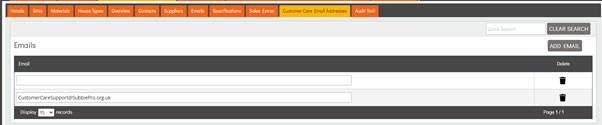
There is no limit to the number of Email Addresses that can be added to the table.
To delete a Customer Care Email Address, the user must enter Edit mode and select the Recycle Bin icon located at the far right of the relevant row in the table.
Selecting the delete icon displays a confirmation pop-up asking, “Are you sure you want to delete this email?”, followed by the Email Address. Selecting Yes permanently removes the email address from the list table.
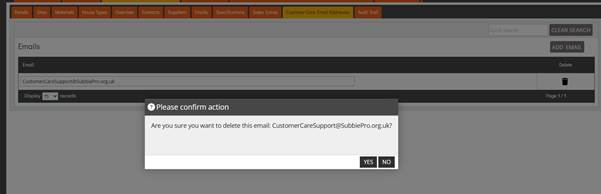
Deleted Customer Care Email Addresses are excluded from future Customer Care Builder Updates, Booking Confirmations, and Quotes.