Site Information
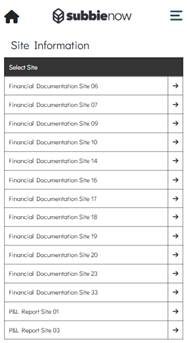
The Site Information area provides functionality allowing the Operative to view Drawings, Plot Information Drawings, and Sales Extras associated with a Plot. The area also provides the ability to download Drawings directly to the user’s device when required.
When the user enters the Site Information area, the Operative Portal will display all Sites currently assigned to the signed-in Operative. The user can then select a Site, which will display the Site Information Drawings and Site Information Plot Information sections for that Site.
Site Information Drawings
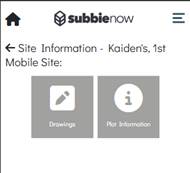
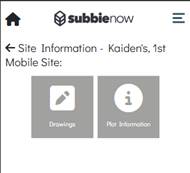
Once a Site has been selected within the Site Information area, the Operative Portal will display two tiles. To access the Site Information Drawings area, the user must select the Drawings tile.
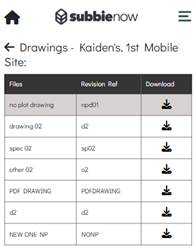
Once the Drawings tile has been selected, the Drawings table will be displayed. The table consists of three columns: Files, Revision Ref, and Download.
The Files column displays the name of each Drawing available for download.
The Revision Ref column displays the revision reference associated with each Drawing.
The Download column displays a download icon for each Drawing. Selecting this icon will instantly download the selected Drawing locally to the user’s device so it can be viewed.
Site Information Plot Information
The Site Information Plot Information area allows Operatives to view Sales Extras and view or download Plot Information Files associated with a selected Plot.
Once a Site has been selected within the Site Information area, the Operative Portal will display two tiles. To access the Site Information Plot Information area, the user must select the Plot Information tile.
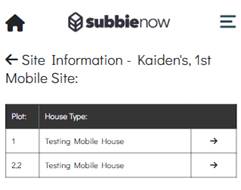
Once the Plot Information tile has been selected, the Plot table will be displayed. The table consists of two columns: Plot and House Type. This displays all non-deleted Plots associated with the selected Site, along with the corresponding House Type linked to each Plot.
When a Plot is selected from the table, the Plot Information page is displayed for the selected Plot.
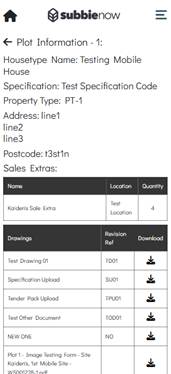
The top of the page displays key details for the selected Plot, including House Type Name, Specification, Property Type, Address, and Postcode.
The Sales Extras are displayed in a dedicated table consisting of three columns: Name, Location, and Quantity. This table lists each Sales Extra associated with the Plot, along with its configured Location and Quantity values.
The Drawings are displayed in a separate table, which also consists of three columns: Drawings, Revision Ref, and Download. This table lists all Drawings assigned to the selected Plot. The Drawings column displays the name of each Drawing, while the Revision Ref column displays the revision reference configured in the Admin System. The Download column provides a download icon for each Plot Drawing, which when selected will instantly download the Drawing locally to the user’s device.