
Sites
The Sites area provides a view of all Sites in the system, along with their financial stages, including differences and margins.
Sites are not created directly in this area; they are created through the Clients Sites section.
The Sites area contains a Quick Search which targets the Site Name column.
This area also includes two dropdown filters: one to filter by Client and the other to filter by the Status of the Site, which is set on the Sites Details page. The Client dropdown filter will list all non-deleted Clients within the System. The Status filter has 3 options which are Tender, Active & Completed.
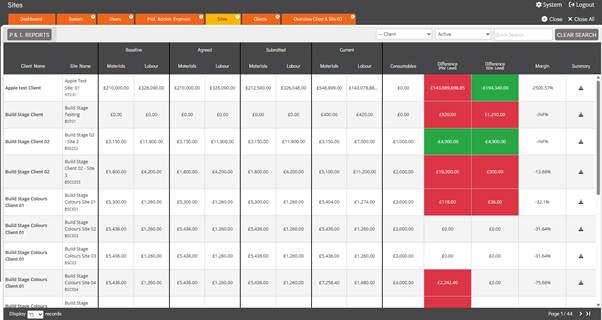
The columns displayed in the table depend on the selection made in the Status filter. When the filter is set to Active, there is several columns each providing specific information about the Sites, as described below:
- Client Name – This column displays the Client Name associated with the Site.
- Site Name – This column displays the Site Name that is set within the Site Details page.
- Baseline
- Materials – The Baseline Materials figure shows the cost of all Materials on the Site at the time it was made Active. If a Site is set back to Tender and then changed to Active again, the Baseline figures will be recalculated and updated to reflect the current material costs at the time it is reactivated.
- Labour – The Baseline Labour figure shows the cost of all Materials on the Site at the time it was made Active. If a Site is set back to Tender and then changed to Active again, the Baseline figures will be recalculated and updated to reflect the current labour costs at the time it is reactivated.
- Agreed
- Materials – TheAgreed Materials figure refers to all Material costs that have been included in the latest agreed Price Submission.
- Labour – TheAgreed Labour figure refers to all Labour costs that have been included in the latest agreed Price Submission.
- Submitted
- Materials – The Submitted Materials figure refers to all Material costs that have been included in the latest Price Submission which has not yet been agreed.
- Labour – The Submitted Labour figure refers to all Labour costs that have been included in the latest Price Submission which has not yet been agreed.
- Current
- Materials – TheCurrent Material figure refers to the latest calculated cost of all Materials associated with the Site. These figures are system-generated based on the Materials and rates recorded at that point in time and have not yet been submitted or agreed.
- Labour – TheCurrent Labour figure refers to the latest calculated cost of all Labour Items associated with the Site. These figures are system-generated based on the Labour Items and rates recorded at that point in time and have not yet been submitted or agreed.
- Consumables – The Consumables figure represents the Consumables Amount set within the Site’s Financials section. As the Consumables Amount is defined for a Build Stage, this figure is calculated by multiplying that amount by the total number of Plots containing the relevant Build Stage.
- Difference (Plot Level) – The Difference (Plot Level) figure shows the cost Differences between the Agreed Cost and the Actual Cost at the Plot Level. The figure will appear green to indicate a reduction in cost or will appear in red to indicate an increase in cost.
- Difference (Site Level) – The Difference (Site Level) figure shows the cost Differences between the Agreed Cost and the Actual Cost at the Site Level. The figure will appear green to indicate a reduction in cost or will appear in red to indicate an increase in cost.
- Margin – The Margin Percentage is calculated based on the Plot Billing Price and Sales Extras compared against the costs at the Plot level.
- Summary – The Summary column contains a download icon, when selected, the system generates a CSV file containing financial information about the Site, including Baseline, Agreed, Submitted, Last Import, Consumables Costs and Site Uplift.
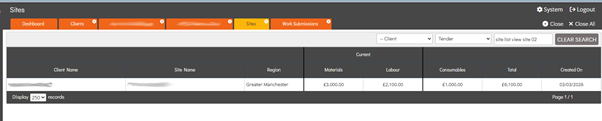
When the filter is set to Tender, the table columns are adjusted, as Tender Sites do not yet have the same level of financial information available for display. The Tender-specific columns are outlined below:
- Client Name – This column displays the Client Name associated with the Site.
- Site Name – This column displays the Site Name that is set within the Site Details page.
- Region – This displays the Region that is assigned to the site. This is set within the Site Details page.
- Current
- Materials – TheCurrent Material figure refers to the latest calculated cost of all Materials associated with the Site. These figures are system-generated based on the Materials and rates recorded at that point in time and have not yet been submitted or agreed.
- Labour – TheCurrent Labour figure refers to the latest calculated cost of all Labour Items associated with the Site. These figures are system-generated based on the Labour Items and rates recorded at that point in time and have not yet been submitted or agreed.
- Consumables – The Consumables figure represents the Consumables Amount set within the Site’s Financials section. As the Consumables Amount is defined for a Build Stage, this figure is calculated by multiplying that amount by the total number of Plots containing the relevant Build Stage.
- Total – The Total column represents the total cost for all Plots on the Site.
- Created On – The Created On column displays the date on which the Site was created.
When the filter is set to Completed, the table columns are adjusted to reflect that the Site contains finalised financial information. The Completed-specific columns, which display the finalised costs, are outlined below:
- Client Name – This column displays the Client Name associated with the Site.
- Site Name – This column displays the Site Name that is set within the Site Details page.
- Region – This displays the Region that is assigned to the site. This is set within the Site Details page.
- Baseline
- Materials – The Baseline Materials figure shows the cost of all Materials on the Site at the time it was made Active. If a Site is set back to Tender and then changed to Active again, the Baseline figures will be recalculated and updated to reflect the current material costs at the time it is reactivated.
- Labour – The Baseline Labour figure shows the cost of all Materials on the Site at the time it was made Active. If a Site is set back to Tender and then changed to Active again, the Baseline figures will be recalculated and updated to reflect the current labour costs at the time it is reactivated.
- Final
- Materials – The Final Materials figure shows the cost of all Materials on the site at the time it was Completed.
- Labour – The Final Labour figure shows the cost of all Labour on the site at the time it was Completed.
- Consumables – The Consumables figure represents the Consumables Amount set within the Site’s Financials section. As the Consumables Amount is defined for a Build Stage, this figure is calculated by multiplying that amount by the total number of Plots containing the relevant Build Stage.
- Difference – The Difference figure represents the difference between the Baseline Costs and the Final Costs.
- Completed On – The Completed On column displays the date the Site was set to Completed.